Repair case study · Dubai
Dell XPS RAM upgrade in Dubai: picked up with 16 GB, back with 32 GB the same day

We picked up a Dell XPS from a customer in Dubai who wanted more memory. It had 16 GB of RAM. At our workshop we upgraded it to 32 GB with OEM memory, and the job was closed the same day.
The repair at a glance
| Detail | This repair |
|---|---|
| Device | Dell XPS (Intel Core i7-10750H) |
| Request | RAM upgrade from 16 GB to 32 GB |
| Service | Pick-up and return in Dubai |
| Area | Dubai |
| Date | 14 November 2026, same day |
| Part fitted | OEM RAM |
| Technician | Sribin Sreedharan |
| Price range | AED 1,200 to 1,500 |
| Warranty | 1-year warranty (12 months) |
Before and after
How to check how much RAM your laptop has
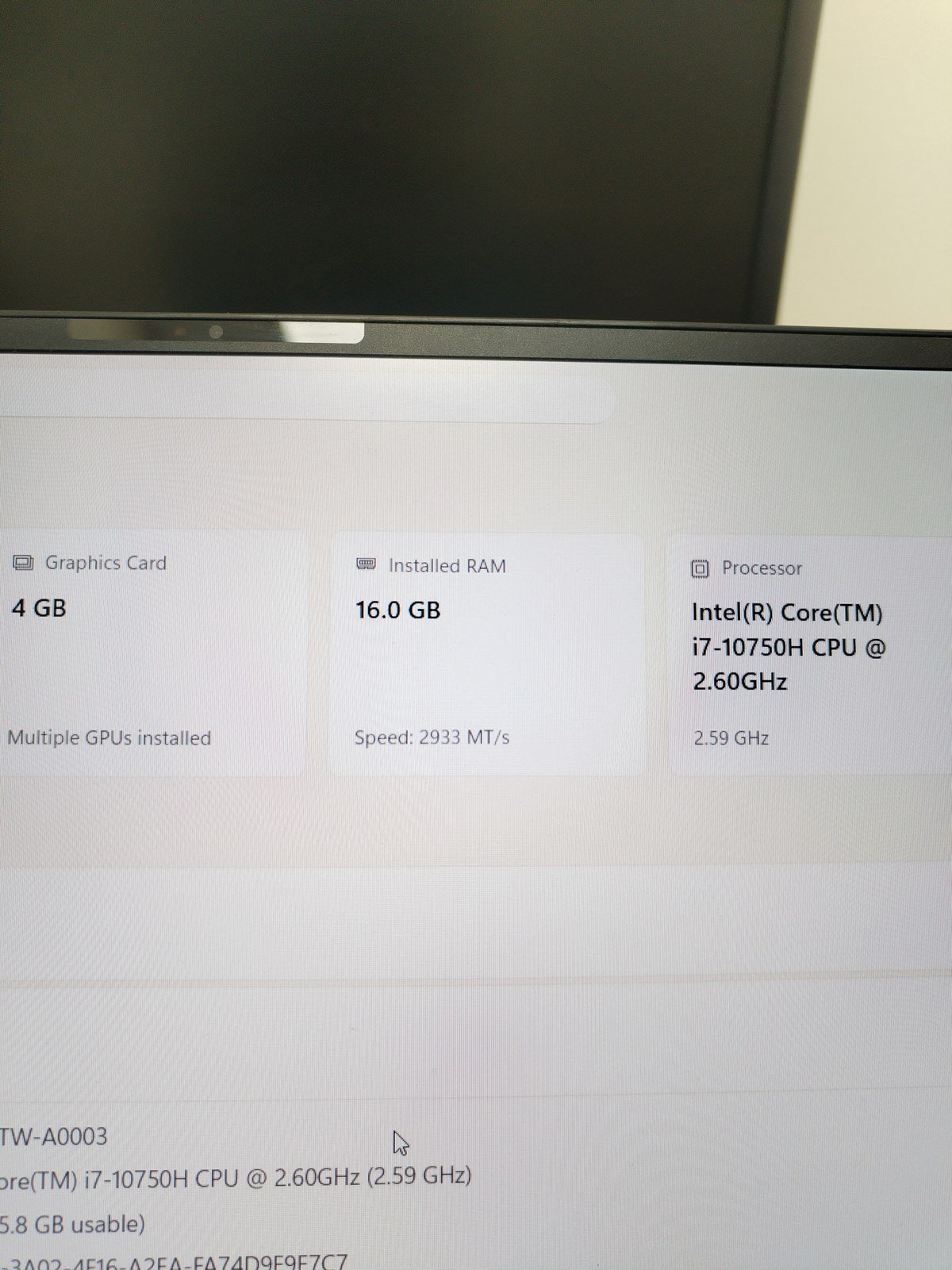
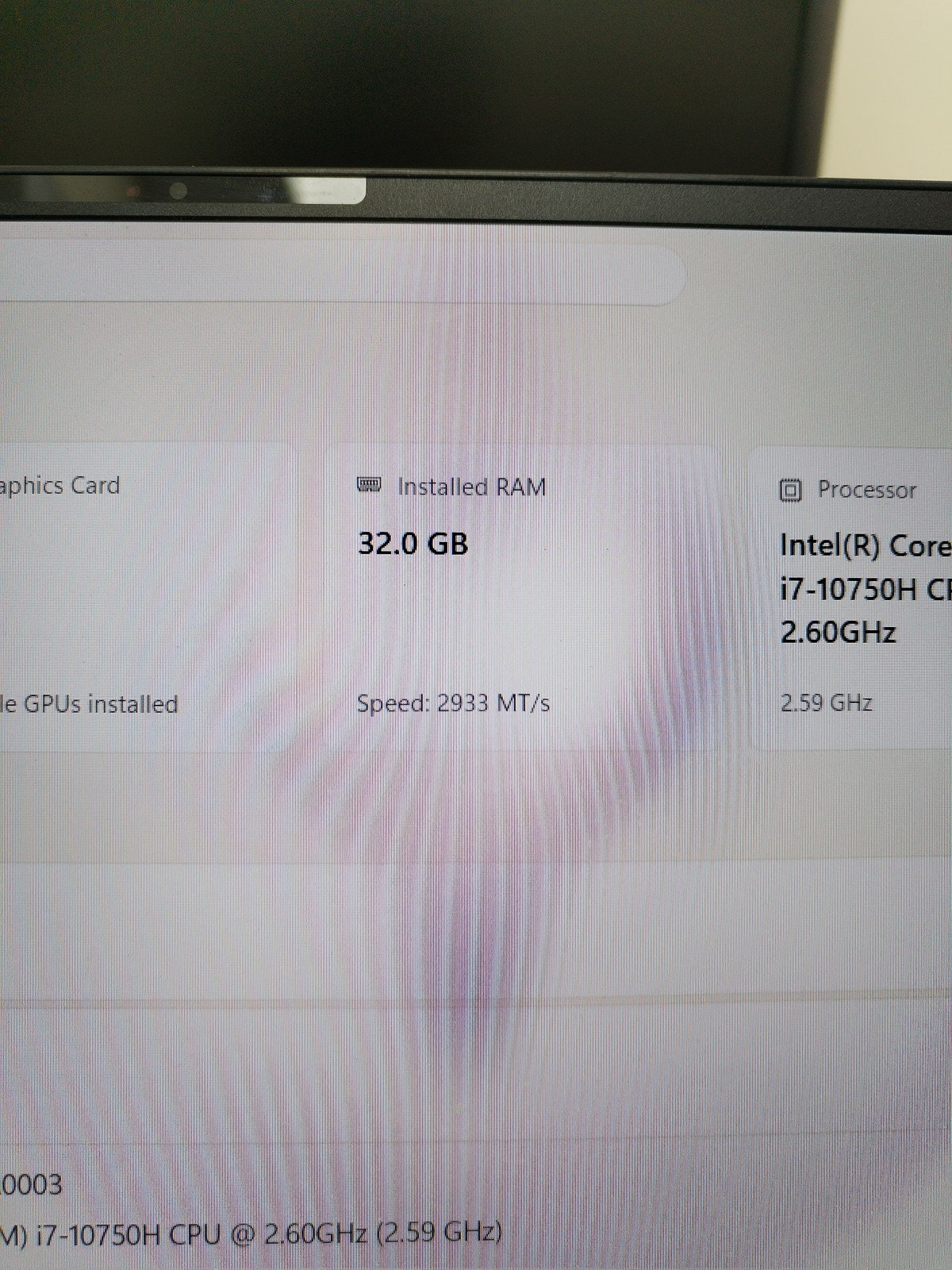
Both photos show the same Windows screen: Settings, then System, then About. The Installed RAM box tells you how much memory the laptop has and how fast it runs. It is the quickest way to know where you are starting from before an upgrade.
On this XPS the number went from 16.0 GB to 32.0 GB. The speed stayed at 2933 MT/s, so the laptop runs the new memory at the same speed as the old. It is also the easiest way to check the work yourself when the laptop comes back.
The full timeline
- 09:26 Job logged at Techman for a diagnostic
- 15:42 Before and after photos saved in our technician app, showing 16 GB and then 32 GB
- 17:11 Job updated to RAM replacement and closed as repaired and collected
The repair
Sribin handled this one. The customer wanted a RAM upgrade, and the XPS had 16 GB to start with. Sribin fitted OEM memory and took it to 32 GB. After the upgrade, Windows reports 32.0 GB of installed RAM running at 2933 MT/s.
What we checked before it went back
For a memory upgrade, the first check is that Windows sees all of it. On this XPS it shows 32.0 GB installed, at the same 2933 MT/s as before.
Every device that leaves our workshop also goes through the same quality check. For a laptop that covers:
- Display: brightness, colour, and no lines or dead spots
- Keyboard and touchpad
- Charging
- Speakers, microphone and camera
Price and warranty
A RAM upgrade for a Dell XPS usually costs between AED 1,200 and AED 1,500 at Techman, with OEM memory. The exact price depends on how much memory you want and the part available on the day.
The upgrade comes with a 1-year warranty (12 months).
Thinking about more RAM?
Check what you have first. Open Settings, System, About in Windows and note the Installed RAM and speed. Send us that screen with your model.
Back up before any repair. A RAM upgrade does not touch your storage, but a fresh backup is always a good idea.
Check it when it comes back. Open the same screen again. You should see the new total straight away.
Frequently asked questions
How much is a Dell XPS RAM upgrade in Dubai?
At Techman it is usually between AED 1,200 and AED 1,500 with OEM memory. It comes with a 1-year warranty (12 months).
How long does it take?
This XPS was logged in the morning and the job was closed the same afternoon.
Will I lose my files?
No. RAM is not where your files live, so an upgrade does not touch your storage. A backup before any repair is still a good idea.
Do I have to bring the laptop in?
No. For this job we picked the laptop up in Dubai, upgraded it at our workshop and returned it. Message us on WhatsApp to arrange it.
Want more RAM in your laptop?
Send your laptop model on WhatsApp. A technician replies with a price and arranges a pickup.